
2 photos from ORACLE Lighting. Select the photo to enlarge it.
ORACLE TRIGGER Jeep JK Fusebox Controller Bracket
Fits: Jeep Wrangler 2007-2010; Jeep Wrangler JK 2018
Email for price. ORACLE is running a sale on its own store right now, so we quote this part by email: tell us the part and your ZIP code and we reply with a delivered price before you pay.
No email app? Write to rrmotorservices@gmail.com
Email a question about this partor write to rrmotorservices@gmail.com
Ships from ORACLE Lighting in Metairie, Louisiana. We order it from ORACLE when you place your order; ORACLE states that most items ship within 1-2 business days unless out of stock (pre-assembled lights after ORACLE's 3-5 business day build), and we email you the tracking. Your card is only charged after the supplier confirms the part. Stock shown is ORACLE's (checked November 8, 2026); we confirm it with ORACLE before charging your card.
Notice: Warning: This product contains chemicals known to the State of California to cause cancer or birth defects or other reproductive harm. For more information: www.P65Warnings.ca.gov
Description
Part Number: 2010
Use the TRIGGER Jeep JK Fusebox Controller Bracket to expand the connectivity of your TRIGGER Accessory Control System!
The TRIGGER JK underhood mounting system designed for quick and easy installation on top of the fuse box of a 2007 to current Jeep Wrangler. In fact, mount the TRIGGER controller module in an otherwise unused location under the hood. Furthermore, it requires no drilling and is easily removable without causing any damage to the vehicle. Laser cut aluminum sheet metal for long lasting strength and durability. Indeed, designed only for use with the TRIGGER Accessory Control System (not included).
For use with the TRIGGER 4 PLUS and TRIGGER 6 SHOOTER Wireless Accessory Control Systems
Product description from ORACLE Lighting.
Photos, product description, specifications, install guides and fitment from ORACLE Lighting (oraclelights.com and ORACLE's dealer product data). Sold by RR Motor Services LLC, an authorized ORACLE Lighting dealer.
How to use
2010 C Guide
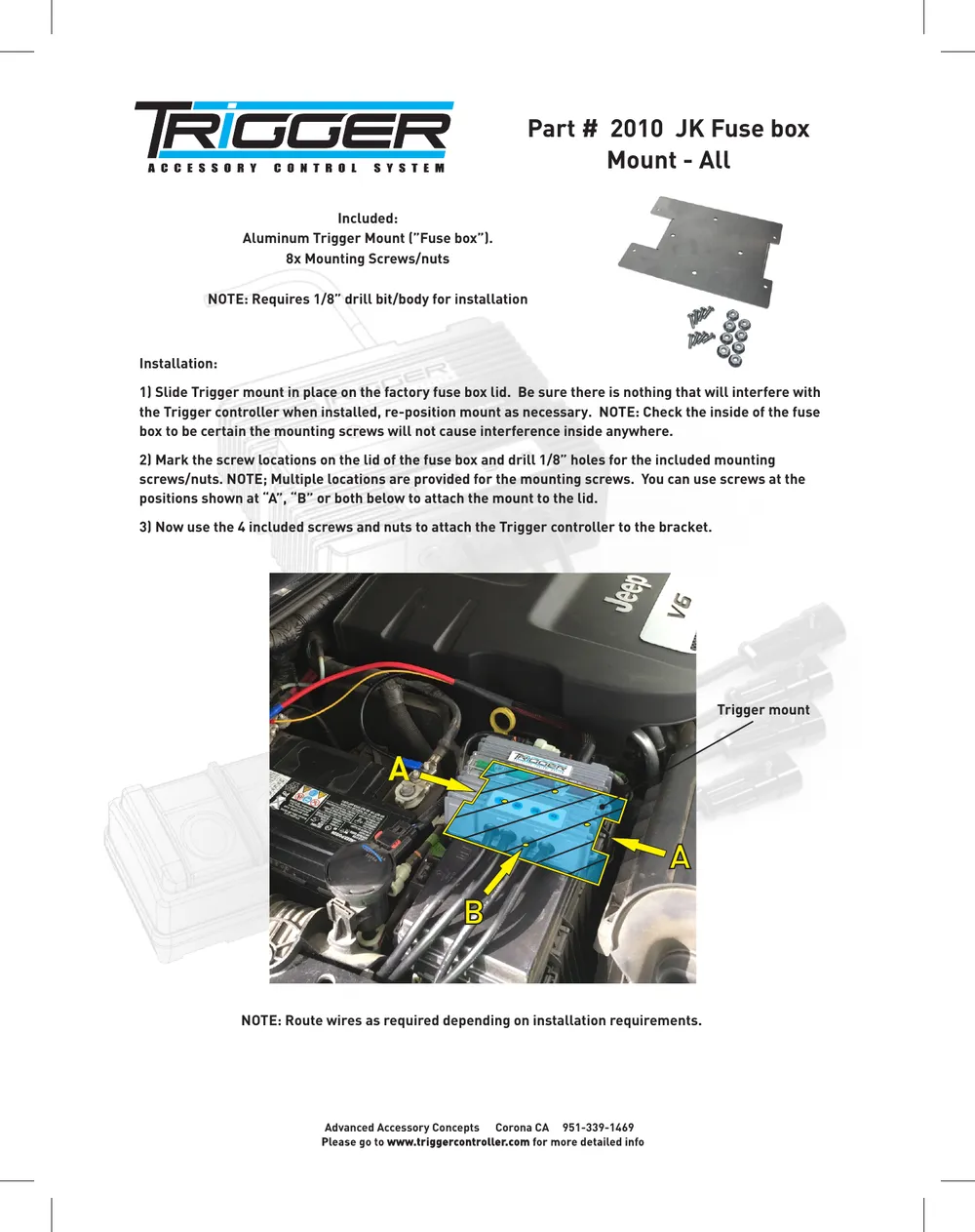
ORACLE's installation guide (1 page), shown as printed with its pictures and diagrams.
2010 C Guide: pages with pictures (1)
Text of this guide
Part # 2010 JK Fuse box Mount - All Included: Aluminum Trigger Mount (”Fuse box”). 8x Mounting Screws/nuts NOTE: Requires 1/8” drill bit/body for installation Installation: 1) Slide Trigger mount in place on the factory fuse box lid. Be sure there is nothing that will interfere with the Trigger controller when installed, re-position mount as necessary. NOTE: Check the inside of the fuse box to be certain the mounting screws will not cause interference inside anywhere. 2) Mark the screw locations on the lid of the fuse box and drill 1/8” holes for the included mounting screws/nuts. NOTE; Multiple locations are provided for the mounting screws. You can use screws at the positions shown at “A”, “B” or both below to attach the mount to the lid. 3) Now use the 4 included screws and nuts to attach the Trigger controller to the bracket. Trigger mount A A B NOTE: Route wires as required depending on installation requirements. Advanced Accessory Concepts Corona CA 951-339-1469
How-to instructions and step photos from ORACLE Lighting.
