
2 photos from ORACLE Lighting. Select the photo to enlarge it.
ORACLE TRIGGER 6 SHOOTER RF Remote Replacement
Fits: Universal fitment; check the dimensions and wiring before ordering.
Email for price. ORACLE is running a sale on its own store right now, so we quote this part by email: tell us the part and your ZIP code and we reply with a delivered price before you pay.
No email app? Write to rrmotorservices@gmail.com
Email a question about this partor write to rrmotorservices@gmail.com
Ships from ORACLE Lighting in Metairie, Louisiana. We order it from ORACLE when you place your order; ORACLE states that most items ship within 1-2 business days unless out of stock (pre-assembled lights after ORACLE's 3-5 business day build), and we email you the tracking. Your card is only charged after the supplier confirms the part. Stock shown is ORACLE's (checked November 8, 2026); we confirm it with ORACLE before charging your card.
Notice: Warning: This product contains chemicals known to the State of California to cause cancer or birth defects or other reproductive harm. For more information: www.P65Warnings.ca.gov
Description
Part Number: 3015
The TRIGGER 6 SHOOTER RF Remote Replacement, to expand the connectivity of your TRIGGER Wireless Accessory Control System! Well, maybe not expand per se, but rather 'replace' ... as the title says. Or expand ... expand works too.
The base is pre-wired for an optional connection to 12-volt power. Connect to activate individual switch backlights and control backlight color using our free app!
Buy another RF Remote and have an extra on-hand ready when you need it! Includes one RF Remote and one Remote Base. Not Sold Separately.
CR2032 Batteries are not included.
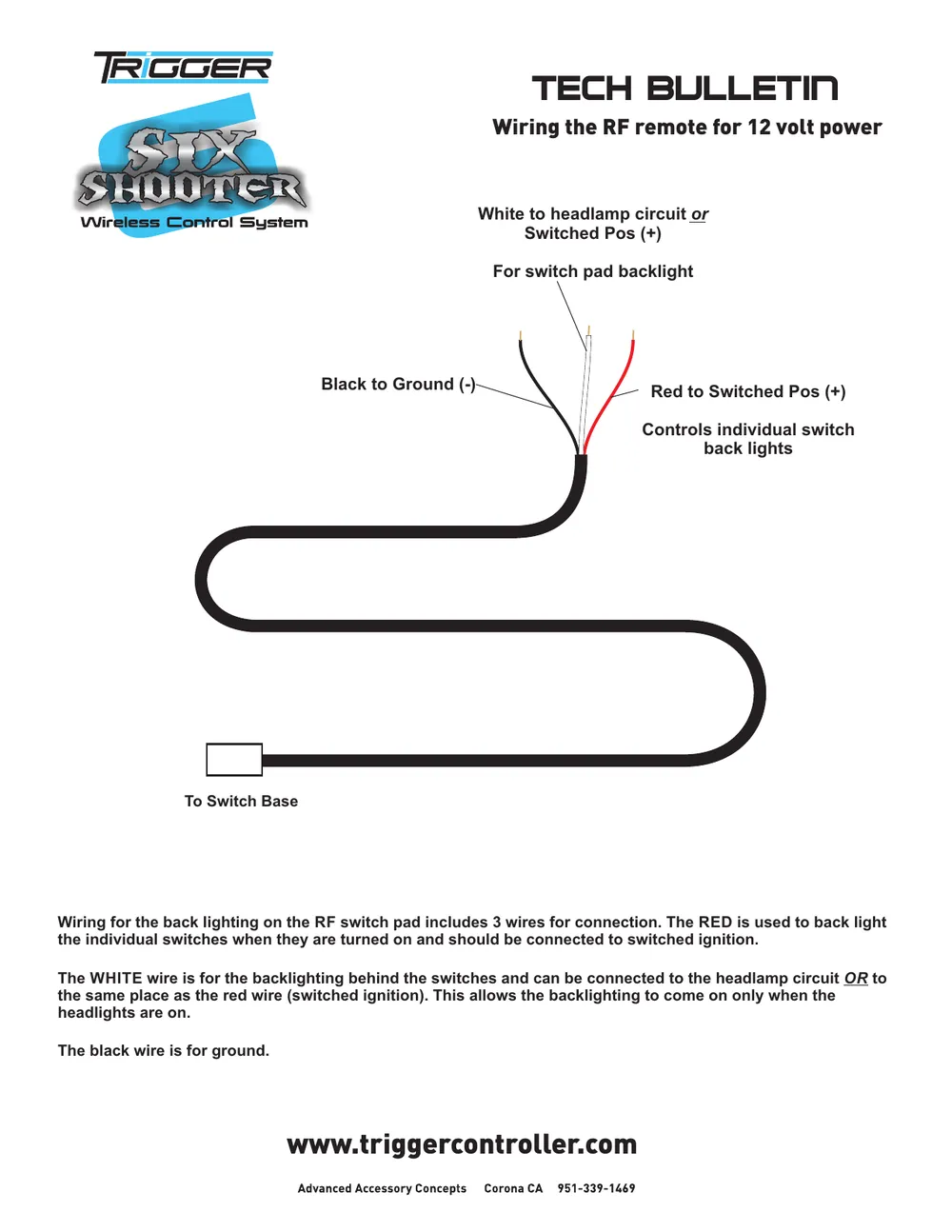
View How to Wire the RF Remote to 12V Power
For use with the TRIGGER 6 SHOOTER Wireless Control System
Product description from ORACLE Lighting.
Photos, product description, specifications, install guides and fitment from ORACLE Lighting (oraclelights.com and ORACLE's dealer product data). Sold by RR Motor Services LLC, an authorized ORACLE Lighting dealer.
How to use
3015 I Guide
ORACLE's installation guide (1 page), shown as printed with its pictures and diagrams.
3015 I Guide: pages with pictures (1)
Text of this guide
Wiring the RF remote for 12 volt power White to headlamp circuit or Switched Pos (+) For switch pad backlight Black to Ground (-) Red to Switched Pos (+) Controls individual switch back lights To Switch Base Wiring for the back lighting on the RF switch pad includes 3 wires for connection. The RED is used to back light the individual switches when they are turned on and should be connected to switched ignition. The WHITE wire is for the backlighting behind the switches and can be connected to the headlamp circuit OR to the same place as the red wire (switched ignition). This allows the backlighting to come on only when the headlights are on. The black wire is for ground. www.triggercontroller.com
How-to instructions and step photos from ORACLE Lighting.


